The base Mac mini M4 is one of the best-value computers Apple has ever made, so the real question for a lot of buyers isn't "Mac mini?" but "do I need the M4 Pro?" The Pro adds more cores, dramatically more memory bandwidth, and Thunderbolt 5, starting around $1,399. For the right person it's transformative; for everyone else it's money down the drain. Here's how to tell which one you are.
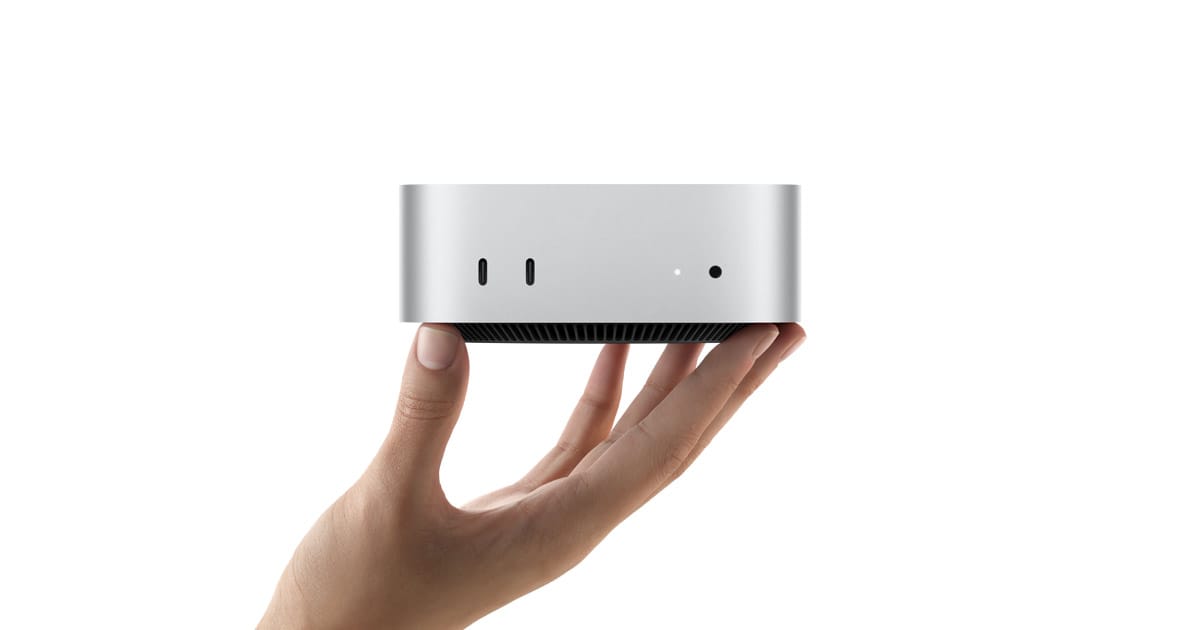
What it is
The same tiny aluminum Mac mini, stepped up to the M4 Pro chip: more CPU and GPU cores, support for more unified memory, ~2× the memory bandwidth of the base M4, and crucially Thunderbolt 5. That bandwidth and I/O are the whole point, they're what separate the Mac mini M4 Pro from its cheaper sibling for demanding work.
Who it's for
Creators and pros whose workloads scale with cores and bandwidth: video editing, music production with lots of tracks and virtual instruments, heavy code compiling, and some local AI. Owners with those needs are clear about the value:
"The Pro is better, more memory bandwidth, which you need, Thunderbolt 5 to speed up external drives, and the two extra performance cores help depending on how many layers you're running.", u/PurrciousMetals, r/macmini
The Thunderbolt 5 upgrade alone matters if you live on fast external storage and docks.
Key specs & the real tradeoffs
Here's the counterweight: for most people, the base M4 is already more than enough, and the Pro premium is wasted. As one owner put it, "I just got two base M4s and they've been great", adding the advice nearly every Mac buyer should hear: "don't spend a penny on Apple storage, boot from a fast external; spend on RAM if you need it" (u/qalpi). Apple's storage and memory upgrades are brutally priced, so configure carefully. And with Apple's M5 generation arriving around WWDC, it's worth checking what's current before paying top dollar for an M4 Pro config.
How it compares
Versus the base Mac mini M4: if your work is browsing, office, light photo/video, and everyday dev, save the money, the M4 is the value king. Versus the Mac Studio: if you need even more GPU, memory, or bandwidth (serious 3D, large local models), the Studio is the real step up, not the mini Pro. The M4 Pro mini is the sweet spot for prosumers who've outgrown the base M4 but don't need a Studio.
Mac mini M4 vs M4 Pro vs Mac Studio: the specs that matter
The numbers below are the ones that change how a machine behaves under load. Memory bandwidth, not raw clock speed, is what governs how fast a local language model generates text, so it gets its own column.
| Spec | Mac mini M4 (base) | Mac mini M4 Pro | Mac Studio (M4 Max) |
|---|---|---|---|
| CPU cores | 10 (4P + 6E) | 12 (8P + 4E) | 14 to 16 |
| GPU cores | 10 | 16 (up to 20) | 32 to 40 |
| Neural Engine | 16-core | 16-core | 16-core |
| Memory bandwidth | 120 GB/s | 273 GB/s | 410 to 546 GB/s |
| Unified memory | 16GB std, up to 24GB | 24GB std, options 48GB / 64GB | up to 128GB |
| External I/O | 3x Thunderbolt 4 (40 Gb/s) | 3x Thunderbolt 5 (120 Gb/s) | Thunderbolt 5 |
| Starting price | $599 | $1,399 | $1,999 |
The story of that table is the bandwidth row. The M4 Pro moves data at roughly 2.3x the rate of the base M4, and that ratio is the single best predictor of how the two feel when you point them at the same AI workload.
Can it run local AI?
For local LLMs, two numbers decide almost everything: how much unified memory you have (does the model fit?) and how fast that memory is (how quickly does it generate?). The M4 Pro's 273 GB/s and up-to-64GB ceiling put it in a genuinely useful spot, well past the base M4 but short of a maxed Studio.
What realistically fits, and roughly how it behaves (these are estimates from the device's memory config, not measured benchmarks, since text generation is memory-bandwidth-bound):
- 24GB config: 7B to 14B models at 4-bit quants sit comfortably in memory with room for context. Expect snappy generation, the kind of speed that feels conversational.
- 48GB config: opens up 30B-class dense models and many Mixture-of-Experts models at usable quants. Because only a fraction of an MoE model's weights are active per token, these can run faster than their total size suggests (see our MoE explainer).
- 64GB config: a 70B model at a 4-bit quant fits with headroom, though on 273 GB/s expect generation to slow to a more deliberate pace as the model gets larger. Our 70B memory guide walks through the math.
One caveat: the M4 Pro is strong at generating tokens but its GPU is modest next to a Studio or a discrete card, so prompt processing (chewing through a long input before it starts replying) is the slower half. If you paste huge documents, that lag is where you'll feel the gap. We break down why in prompt processing vs generation. Before you commit to a config, run your exact target model through Can I Run It? and check headroom with the quant picker.
Which config to buy for local AI
If local models are a real reason you're buying, skip the 24GB base. Memory is the one thing you can't add later, and it's exactly what determines which models you can load. The 48GB M4 Pro is the value pick: it runs the 7B to 30B range that covers most day-to-day local work with room to spare. Step up to 64GB only if you specifically want 70B-class models or plan to keep large models resident alongside heavy creative apps. As the owner advice in this guide stresses, put the money into unified memory, not Apple's storage tier, and boot large model libraries from a fast Thunderbolt 5 external instead.
Sources for the specs above
- Apple Mac mini technical specifications
- Apple Support: Mac mini (2024) tech specs
- EveryMac: Mac mini M4 Pro 12-core/16-core GPU 2024 specs
- Apple Mac Studio technical specifications
The verdict
Buy the Mac mini M4 Pro only if your workload genuinely uses the extra cores, the ~2× memory bandwidth, or Thunderbolt 5, music producers, video editors, and developers will feel it. If you can't name a specific reason you need the Pro, the base M4 will delight you for hundreds less. Spend the difference on RAM, not Apple storage.
Before you pay for a Pro config, check whether your target model even fits with our Can I Run It? tool, then weigh the real upgrade cost with the cost calculator.